HostMetro.com Review
HostMetro offers an impressive selection of features with an easy-to-use interface, making this company a natural fit for first time website builders. Using an intuitive cPanel design, which supports many of the web's most popular plugins through Softaculous, site building should be incredibly simple with HostMetro. When you factor in the competitive pricing and SEO friendly features, this growing company also seems like a good choice for new businesses. HostMetro also offers impressive, knowledgeable and responsive customer service to help address any problems that might arise during your hosting experience.

Pricing
HostMetro has two different web hosting plans to choose from: Mega Max Hosting and Business Max Hosting. Both hosting plans come in durations of 1, 2 or 3 years, but Mega Max Hosting offers a one-month option as well. For the 1-month plan, there is a one-time setup fee of $14.49, though longer subscriptions exclude this fee.
Plan works as follows:
| 1 Year Plan | 2 Year Plan | 3 Year Plan | |
| Mega Max | $4.45/mo | $3.45/mo | $2.45/mo |
| Business Max | $6.95/mo | $5.95/mo | $4.95/mo |
All hosting plans will automatically renew for the same duration as the initial term. Billing will take place automatically before the new term of your hosting contract begins. In order to cancel, simply contact the billing department to stop payment on your next term.
If you don't already have a domain name, you can opt to purchase a new one through HostMetro for an additional $14.49/yr. Other optional services are available for purchase, including SSL certificates and additional site security, which can each be added for a nominal fee.
Money Back Guarantee
HostMetro offers all of its customers a 45-Day Money Back Guarantee to ensure that you are satisfied with the level of service you receive. This includes all fees you pay toward hosting services, but won't cover add-ons like domain registry or SSL certificates. In this scenario, the good news is that you will retain the rights to your domain name and will be able to migrate it to another registrar for free, so long as it adheres to ICANN regulations.
Features
The primary difference between the two HostMetro services is their different approaches to SEO and Ecommerce adaptability. One option, Business Metro, is more geared toward sales and Ecommerce than the other option, the Metro Max plan. If you're starting a blog or any other personal website, Metro Max would most likely offer you more than enough features to accomplish your online goals.
| Metro Max | Business Metro | |
| Service Features: | ||
| Hosting Space | Unlimited | Unlimited |
| Bandwidth | Unlimited | Unlimited |
| Cloud Technology | ||
| 99.9% Uptime Guarantee | ||
| Unlimited FTP Accounts | ||
| Unlimited MySQL Databases | ||
| Weekly Backups | ||
| cPanel Control Panel | ||
| Softaculous | ||
| Trendy Website Builder | ||
| RVSiteBuilder | ||
| Domain Name Features: | ||
| Hosted Domains | Unlimited | Unlimited |
| Domain Privacy | $0.50/mo | Free |
| Parked Domains | Unlimited | Unlimited |
| Sub Domains | Unlimited | Unlimited |
| Email Features: | ||
| E-Mail Accounts | Unlimited | Unlimited |
| Web Based Email | ||
| POP3 & IMAP Supported | ||
| Auto Responders | ||
| E-Mail Forwarding | ||
| Mailing Lists | ||
| Customizable E-Mail Filters | ||
| Advanced Spam Protection | ||
| Mobile Devices Supported | ||
| Ecommerce Features: | ||
| SSL Certificate & Dedicated IP | $2.50/mo | Free |
| SiteLock Security Seal | $2.50/mo | Free |
| FREE Shared SSL | ||
| $100 Google AdWords Credit | ||
| FREE SEO Submission | ||
| FREE SEO Consultation | ||
| Business Directory Listing | ||
| Google Checkout Supported | ||
| PayPal Supported | ||
| ZenCart | ||
| osCommerce | ||
| Advanced Firewall | ||
| Additional Features: | ||
| CGI-BIN | ||
| PHP Support | ||
| SSI (Server Side Includes) | ||
| Cron Jobs | ||
| Log Files & Site Analytics | ||
| WordPress | ||
| b2evolution | ||
| Forums | ||
| Flash Supported | ||
Ease of Use
HostMetro has certainly worked hard to design an interface that works easily for people who are trying to build a website, whether they are seasoned vets or first timers in the web hosting game. To see if HostMetro will suit your needs, the company offers several demos of its most popular services. These previews allow potential customers to sample HostMetro before making a decision, since they'll know exactly what type of service they're getting.
The sign-up process is quite simple to follow at every step. If you have yet to secure the rights to the domain you'd like, you may register an available domain name on the sign-up page. Conversely, if you already own your domain and want to switch over to a HostMetro package, simply purchase your desired package, reassign your name server and then you should be off and running.
In terms of site building and design, HostMetro offers access to the popular cPanel control panel, as well as the RVSitebuilder and Trendy Website Builder. These programs may offer the ability for newcomers to build an impressive site through the extensive features and ease-of-use they each provide.
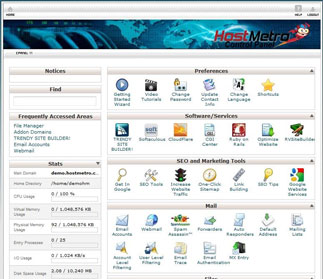
The cPanel has an easy to follow layout, making backend more intuitive and less confusing. Email, files, logs and even more advanced features (like page extensions) will be at the fingertips of every web designer. That being said, less experienced users may be a little put off by an inability to immediately find the plugins they are looking for. These popular plugins are available, however, just by clicking on the Softaculous program installer. Once Softaculous is launched, members will be offered one click installations of their favorite software, including Joomla, WordPress, Drupal, osCommerce, phpBB and Coppermine, just to name a few.
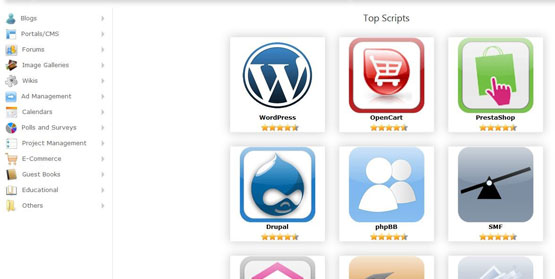
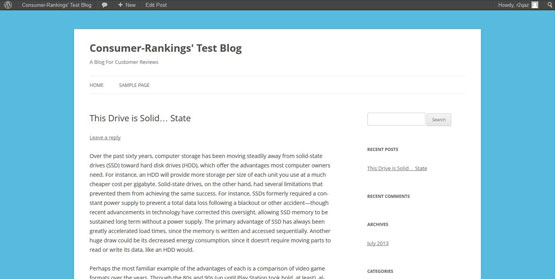
For the purposes of this review, I decided to install a WordPress blog to see exactly how easy plugins were with Softaculous. Through Softaculous, I was able to install WordPress on my website with a click of my mouse and then register an account with WordPress while still in the Softaculous interface. Since it was all linked through my HostMetro membership, I received a helpful email with my admin screenname and password for the WordPress blog. The WordPress interface, as anyone who's used it could tell you, was entirely straight forward and easy to customize. In less than an hour, I had exactly what I was looking for.
Setting up new email accounts for my website was almost as easy as installing my WordPress blog. I simply clicked the Email Accounts option in cPanel, which redirected me to a very straight forward form. Choosing the password can be a little tricky, since it has various difficulty requirements, meaning a generic password might not work. Some helpful approaches include incorporating numbers and special characters into the password, or alternating lowercase and capital letters to make your password more secure.
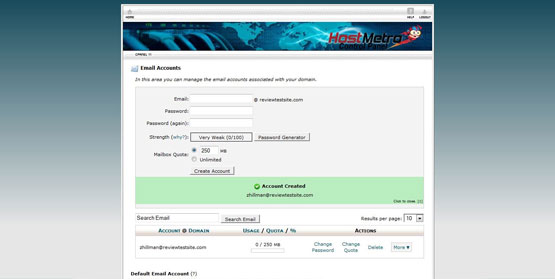
Once your password is accepted, you simply select whether you'd like a limited (250 MB) or unlimited email storage amount. Your account should be available instantly, and you should be able to visit your inbox as soon as you'd like.
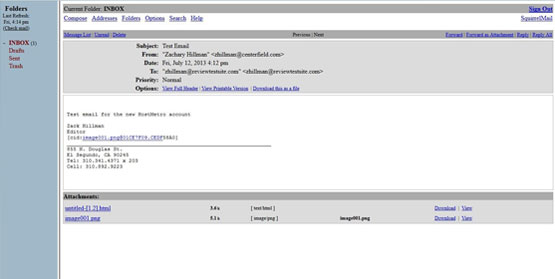
To test the account, I sent an email from my new account to a personal account at 2:12 p.m., which was available in my personal inbox a few seconds later. I then responded to this email to test out the new account's receiving abilities and was pleased when it arrived just a moment later. This entire process only took about a minute.
Customer Support
When I contacted HostMetro's chat support, I found them to be very helpful, answering all of my questions. Unfortunately, getting ahold of this service was more difficult than the other support services offered, which were always available. For quick answers on the fly, though, HostMetro's chat service can't be beat, especially since it will let you work out your problems in real time with someone who can provide assistance with relevant links to tutorials and instructional articles. The service also incorporates a print button, which allows you to print out the advice directly from the chat window.

The phone support team was entirely impressive, fully willing and able to help at a moment's notice. To test the phone service, I placed a call at 2:09 p.m., which was connected to a representative at 2:15 p.m.-just a little over five minutes. The operator's knowledge was very impressive and helped me to resolve my issue in less than 10 minutes.
HostMetro's email support system is very well structured and helpful for all issues a web builder might encounter. I contacted the customer support team several times via email with questions ranging from technical support to billing information. After opening a ticket from the member's area, I received a reply email to inform me that my request had been received. Most of the emails sent during HostMetro's business hours were answered in an hour or less, with straight to the point information that was clear and concise, providing the necessary answers.
The Good
Intuitive cPanel layout
Courteous and knowledgeable customer support
99.9% Uptime Guarantee
The Bad
N/A
The Ugly
None